Fitbod app review: what the AI does well and what it can't
Fitbod costs $15.99 a month for new buyers and writes a good workout from your log. What it does well, what it can't see, and who should pay for it.
In this article9
Our verdict
Fitbod is one of the best workout planners you can buy, at $15.99 a month. It builds good sessions from your log but can't see you lift. If nobody has checked your form, or apps haven't stuck, a live coach suits you better, and how ours works is below.
We sell live coaching, so we'll say where Fitbod is the better buy. We haven't lived in the app: the facts come from Fitbod's own store listings and two hands-on reviews, all footnoted. What we add is what a coach sees that the app can't.
What Fitbod costs in 2026
| Plan | What a new buyer pays | Worth knowing |
|---|---|---|
| Free trial | Nothing for 7 days | You pick monthly or yearly to start it, and it renews into that plan |
| Monthly | $15.99 | The App Store also lists $12.99, the older price |
| Yearly | $95.99, about $8 a month | Also listed at $79.99, the older price |
| Older subscribers | Whatever they signed up at | "Legacy" rows from $7.99 to $59.99 still sit on the listing |
If you already subscribe, you keep the price you signed up at.12 The yearly plan costs half what twelve months would, if you'll stick with it. Two catches. Subscribe during the free week and the rest of the free days are gone.1 And there's no free version: once the trial ends you can still see past workouts, but logging new ones needs a subscription.2
In the US, Fitbod may be HSA or FSA eligible with a letter of medical necessity from a healthcare provider, so ask your plan before you pay.2
How Fitbod picks your workout and your weights
When you sign up, a short quiz asks your goal, your experience (beginner, intermediate or advanced), what equipment you have and how you like to split your week.3 From there, every workout is built from four things:
- Your goal and level, from the quiz.
- What you have to lift with, so it won't ask a garage lifter for a cable machine.
- How recovered each muscle is. Fitbod scores every muscle group from 0 to 100% from what you've trained recently and shows it as a heat map, so after a heavy leg day the next session leans elsewhere. You can override it when you feel ready.2
- What you logged and what you changed. It adjusts from the sets, reps and weights you complete,3 and its listing says the AI "learns from your edits to its workout recommendations".1
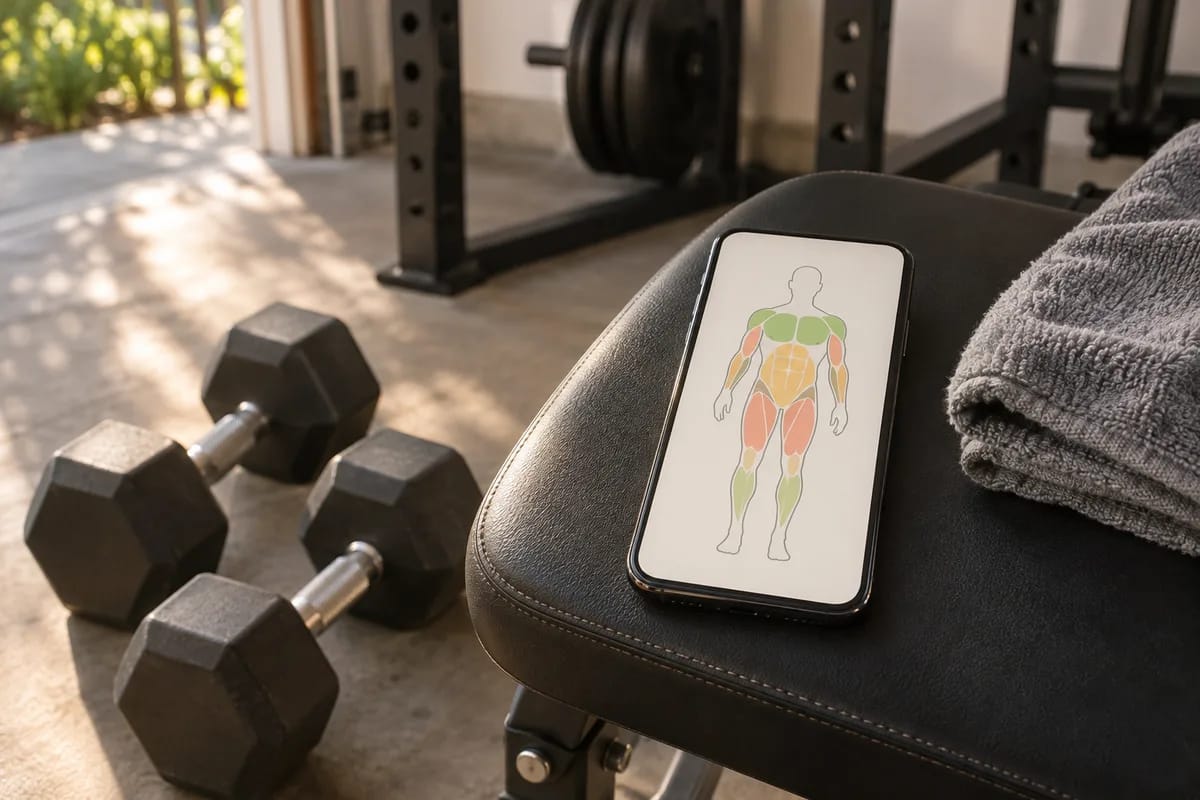
There's also a variety dial. "More Consistent" keeps 70 to 80% of the same exercises week to week, "Balanced" is the default, and "More Variable" swaps exercises often.3
Reviewers keep noticing that the first weights are off, and the reason is simple: the quiz asks what you have, not what you can lift. Garage Gym Reviews' tester, an Olympic weightlifter, wished he could enter his max lifts, because without them the app could "only guess at weights".3 Autonomous's review passes on reports of suggested 35 lb (16 kg) lateral raises, which is a lot for most shoulders.4 The guesses should settle as your log fills, so treat week one as calibration, and don't judge the app, or yourself, on day two.
What it does well
Fitbod has earned its reputation: 4.8 from about 290,000 App Store ratings, an Apple Editor's Choice award, and 4.5 from 32,000 reviews on Google Play.15 What people pay for:
- No planning. Tell it how long you have and a full session is waiting.3
- A big library, well shown. More than 1,000 exercises, each with multi-angle video.1
- Different places, different gear. Save a Location for the garage and another for the hotel gym, and each workout uses only what's there.2
- Progress you can see. A strength score for each muscle group and estimated one-rep-max charts for the squat, deadlift, bench press and overhead press.2
- Phone and watch. Apple Watch, Apple Health, Strava and Fitbit on iPhone; Wear OS on Android.15
For about $16 a month, that's a lot of good software.
What it can't see
Fitbod knows the numbers you type. It doesn't see the rep. Here's one ordinary exercise, goblet squats for 3 × 10 at 35 lb (16 kg):
What the app logged
- 30 of 30 reps done
- Every set ticked off
What happened
- Your heels came up on the last three reps of each set
- The weight drifted onto your toes
As far as the app can tell, that was a good set, and good sets are what it builds the next one on. Nobody says "keep your heels down" on rep 8. A three-star App Store review puts it better than any review site: "how does the home gym goer know if their squat is in good form. I have friends that until they got hurt, did not realize they were doing the movement wrong."6
The other gaps grow from the same root:
- It plans the session, not the set. Autonomous calls the AI "workout-level, not real-time": it builds the session in advance and doesn't re-plan as you lift.4 If set two feels awful, changing set three is your job.
- Long-term structure is thin. The Google Play listing promises "non-linear periodization", but Garage Gym Reviews' tester found the workouts "are not necessarily part of a longer training cycle".53 Fine for general fitness. Thin if you're building toward a number.
- Injuries need your input. There's an Injuries/Limitations setting, but it doesn't override the lifts you've set as focus exercises, so you swap those yourself.2
- The human help is email. The listing offers "pro fitness trainers available via email" for strength questions.1
- Nobody's waiting for you. The workout waits as long as you like. For a lot of people, that's exactly where things go quiet, around week six.
Who should pay for it
Buy it if
- You already train two or three times a week without anyone asking
- You know roughly how a squat and a hip hinge (the bend in a deadlift) should feel, or you'll film yourself
- You want a fresh session built around whatever equipment you have
- About $16 a month is your budget and you want to train at any hour
Skip it if
- You're new to lifting and nobody will ever see your form (the app is easy to use; it just can't check the movement)
- You've started workout apps before and drifted by week three
- You're training for a meet or a specific lift and want a real training block
- You're pregnant, recovering from surgery, or a joint hurts: talk to your clinician first, and don't let any app set your loads
Set it up so the free week is a fair test
If you're in the first column, seven days is enough to know, as long as the app gets honest information.
Select only the equipment you own
Not the full rack you wish you had. A workout built for gear you don't own is one you'll edit all week.
Choose the level you are today, and More Consistent
Not the level you were at 30. Beginner gives the app room to build. More Consistent repeats your lifts, which is the only way to see whether the weights are actually going up.
Start light and log what really happened
Go lighter than suggested in the first two sessions. Change each weight to what you used and log the reps you got, misses included. A log that says 10 when you did 8 teaches the app to push you too fast.
Film one set from the side
Prop your phone at hip height for one squat and one hip hinge, like a Romanian deadlift. It's the only form check you'll get, and filming your lifts explains what to look for.
Decide on day five
If it's a no, cancel by day six (how, in the questions at the end).
If Fitbod isn't the one
- You'd rather plan it yourself. Hevy is a free workout log with no ads. Pro, from $2.99 a month or $23.99 a year, adds a program built from your goal and equipment.7
- You want the same idea for less. Alpha Progression's free version logs workouts and plans you write. Pro builds the plan and suggests a weight for each working set, at $12.99 a month or $79.99 a year.8
- What's missing is a person. That's the next section.
If you want a person, not a plan
Take the same goblet squat with a Bespoke Fit coach. Your coach wrote this week's plan and is live on the video call, in our app on iPhone, Android or a browser, wherever you train. On rep 8 your heels lift, and you hear "heels down, sit back" while you're still in the rep. Your heart rate, from an Apple Watch or a Bluetooth strap, is on their screen. It's slow to settle after set one, so you get an extra 30 seconds. Set two moves cleanly, so set three goes up 5 lb (2 kg). None of that waits for a log. If you doubt a coach can see that through a phone, here's what video does and doesn't show.
2 months in and I haven't skipped a single workout, which has literally never happened before. I don't have to plan anything. I just put on my clothes and fill my water bottle, and my coach does the rest.
Deqa, 27, a member who trains with Angela

What makes that work:
- You're matched, not left to pick. You start with a 30-minute call with a head coach, who matches you to your coach. That coach writes your program.
- 12 members per coach, at most. We enforce it when we assign coaches. With 12, your coach can remember what you lifted last week and how it moved.
- Progress in the app: top lifts, weekly volume, records, a recap after every session, and messages with your coach in between.
It's $299 a month for as many sessions as you book. Sessions run 45 to 90 minutes, and most people settle at around an hour. At twice a week that's about $37 a coached session, and at four a week it's $18.69 (counting four weeks a month). A local personal trainer averages $50 to $90 a session in the US.9 So compare us with a trainer, not with an app.
We're the wrong pick if you're consistent on your own and only want a plan, if $299 a month is too much, if you want to train whenever the day allows (your coach books sessions with you), or if you want meal plans, because we don't do nutrition. Some people do both: Fitbod on their own days and a coach on the others. If you do, tell your coach what Fitbod has you doing.
For the line-by-line, see our Fitbod comparison. Still torn? Workout app vs personal trainer sorts out which jobs each does well, and our roundup of apps with a real human coach compares us with the rest.
If you'd like to see the difference for yourself, it's 14 days free, then $299/mo. The 14 days start at your first session, a reminder comes 3 days before the first charge, and cancelling before then costs nothing.
Three quick questions
Is Fitbod good for weight loss? It can build the workouts. Losing weight is one of the goals you can pick in setup. But Fitbod doesn't coach food, and Garage Gym Reviews says plainly it offers zero nutrition support, so the eating side is on you or someone else.3
How do I cancel Fitbod, and can I get a refund? On iPhone: Settings, your name, Subscriptions, Fitbod, Cancel Subscription. On Android: subscriptions in Google Play. Cancel at least 24 hours before the trial or billing period ends. App Store refunds go through Apple at reportaproblem.apple.com. Garage Gym Reviews reports a full refund within 10 days of a charge, which we couldn't confirm with Fitbod.1310
Does Fitbod work at home with just dumbbells? Yes. Save a Location with only what you own, down to bodyweight, and it builds from that. Fitness Drum's reviewer tested a profile with one set of dumbbells and a wobbly bench, and still got a workout that left her sore the next day.2
Sources
-
Apple, 2026. Fitbod: Gym & Fitness Planner, US App Store listing: "7 DAYS FREE", in-app purchases (monthly plans at $12.99 and $15.99, yearly at $79.99 and $95.99, "Legacy Pricing" rows from $7.99 to $59.99), auto-renew and trial terms, 4.8 from 290K ratings, Apple Editor's Choice, 1,000+ exercises with multi-angle videos, "Adaptive AI learns from your edits", trainers by email, Apple Health, Strava, Fitbit and Apple Watch. Read November 12, 2026. Fitbod competes with us. ↩ ↩2 ↩3 ↩4 ↩5 ↩6 ↩7 ↩8
-
Jennifer Graham, September 30, 2026. Fitbod Review. Fitness Drum: the price rise and legacy rates, no free version after the trial (past workouts stay viewable, new ones can't be logged), possible HSA/FSA reimbursement with a letter of medical necessity, Locations, recovery percentages and overriding them, strength scores and estimated one-rep maxes, the Injuries/Limitations setting, and the dumbbells-and-bench home test. Read November 12, 2026. ↩ ↩2 ↩3 ↩4 ↩5 ↩6 ↩7 ↩8
-
Stephen Sheehan, updated September 25, 2026. Expert-Tested: Fitbod Review. Garage Gym Reviews, tested by Caine Wilkes: price, the trial, the onboarding questions, the variability settings, max lifts and "only guess at weights", training cycles, "zero nutrition support", lose weight as a goal, and the 10-day refund. Read November 12, 2026. ↩ ↩2 ↩3 ↩4 ↩5 ↩6 ↩7 ↩8
-
Amanda Roberts, June 13, 2025. Fitbod App Review. Autonomous blog: reported early weight suggestions and "workout-level, not real-time". Read November 12, 2026. ↩ ↩2
-
Google Play, 2026. Fitbod: Workout & Gym Planner: 4.5 from 32K reviews, 1M+ downloads, "Non-linear periodization", Wear OS. Read November 12, 2026. ↩ ↩2 ↩3
-
App Store review of Fitbod, 3 stars, January 7, 2025, on the US App Store listing. Quoted verbatim. ↩
-
Apple, 2026. Hevy, US App Store listing: "Free, with no ads"; Pro adds "Hevy Trainer: a program and ongoing guidance based on your experience, goal, available equipment, and preferences"; in-app purchases from $2.99 a month and $23.99 a year. Read November 12, 2026. ↩
-
Alpha Progression, 2026. Alpha Progression: regular US pricing $12.99 a month or $79.99 a year; the free version includes workout logging and manually created plans; Pro builds the plan and recommends "a weight and rep count for each working set". Read November 12, 2026. ↩
-
Bark, updated January 16, 2026. How much does a personal trainer cost?. A US average of $50 to $90 a session, depending on where you live. ↩
-
Apple Support. Cancel a subscription from Apple and Request a refund for apps or content that you bought from Apple; Google Play Help, Cancel, pause, or change a subscription on Google Play. Read November 12, 2026. ↩